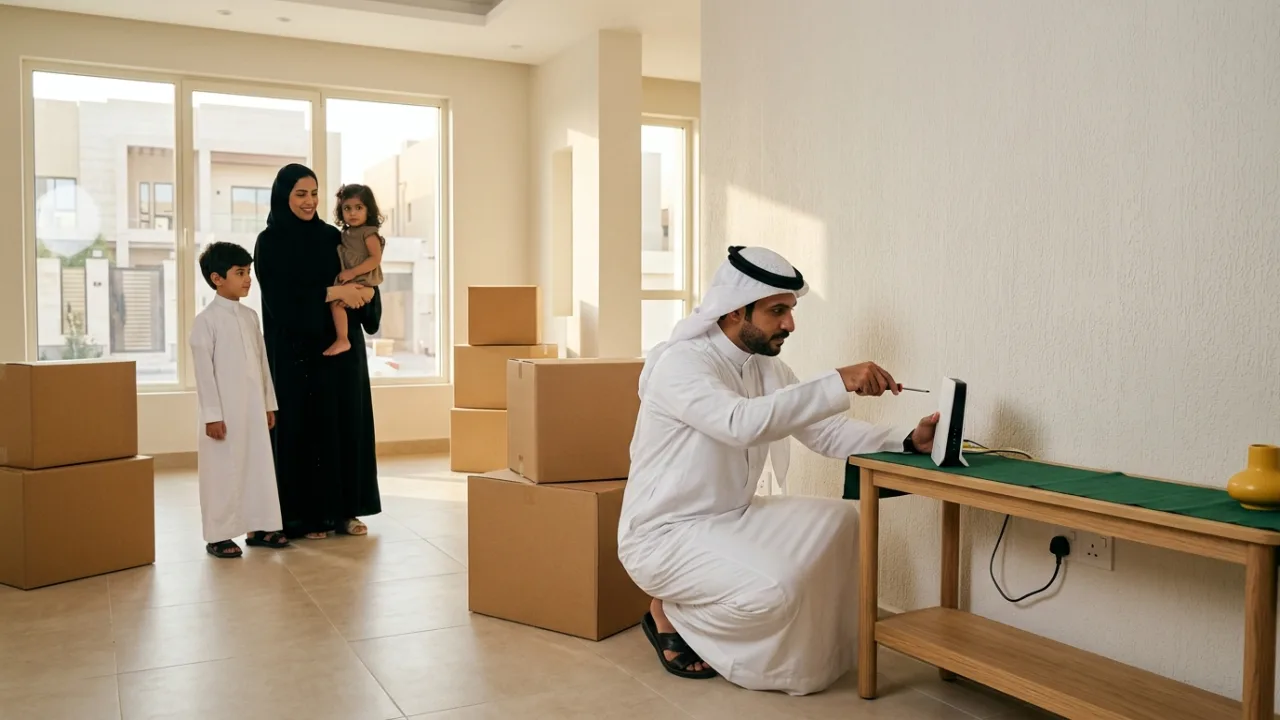
Moving home can change your Salam service eligibility. Fiber requires access at the new building, while HomeFi 5G may have location-specific use rules. Carrying a router to a new address does not establish that service transfer is permitted or ready.
Check the new address before moving day, confirm relocation terms with the operator, and compare new subscription options if necessary.
- Architectural Divergence: Relocating Fixed Optical Fiber (FTTH) vs 5G Wireless Gateways
- Phase 1: Re-Qualifying the New Address: Reading the Wall FAT Plate and National Address
- Phase 2: The Saudi Open Access Bitstream Framework: Service Across Other Carrier Infrastructure
- Phase 3: Regulatory Relocation Fees and Contract Commitment Rules Under CST Bylaws
- What Happens When Your New Residence Has No Fiber Coverage? (No-Penalty Termination Rights)
- Phase 4: Hardware Handling Rules: What to Dismantle and What Must Remain Behind
- Phase 5: The Strategic 14-Day Relocation Roadmap (T-Minus 14 Days to Activation)
- Phase 6: Bridging the Transition Gap: Zero-Downtime Telecommuting Continuity
- Phase 7: Leveraging the Move for Network Optimization: Eradicating Wi-Fi Dead Zones
- Phase 8: Post-Relocation Billing Audits and De-Provisioning the Previous Address
- The Comprehensive Moving Day Broadband Checklist
1. Architectural Divergence: Relocating Fixed Optical Fiber (FTTH) vs 5G Wireless Gateways#
Broadband relocation requirements depend entirely on your underlying transport medium:
A. Fixed Optical Fiber (Salam Fiber FTTH)#
- Physical Dependency: An optical fiber service is not an ambient signal; it consists of a continuous 9/125µm single-mode glass core routed from an aggregation Optical Line Terminal (OLT) in the local street cabinet into the building's exterior Fiber Access Terminal (FAT) box, terminating in your domestic wall plate.
- Relocation Requirements: Transferring fiber necessitates a formal carrier relocation order. A certified telecom technician must physically visit the new neighborhood cabinet to patch optical jumpers, verify line attenuation, and link your Optical Network Terminal (ONT) serial number to the new port.
B. 5G Wireless Home Broadband (Salam 5G Home Broadband)#
- Radio-Frequency Dependency: 5G gateways connect wirelessly to local cellular base station sectors.
- Relocation Requirements: Relocating a 5G gateway is significantly simpler and faster; however, it mandates prior verification of 5G sector capacity at the new geographic coordinates, followed by an administrative National Address update on your account profile to align the SIM profile with the local tower.
2. Phase 1: Re-Qualifying the New Address: Reading the Wall FAT Plate and National Address#
The most vital task following property lease signing or purchase is independent address qualification:
A. The District-Level Coverage Fallacy#
In major metropolitan regions (Riyadh, Jeddah, Dammam, Khobar), broad neighborhood names can be highly misleading. One side of a boulevard in Al-Malqa or Al-Narjis may boast active Salam gigabit fiber, while a brand-new residential development across the road still awaits optical infrastructure deployment. Never assume an address has fiber solely because the broader district is developed.
B. Inspecting the Physical Building Wall Plate (FAT Plate)#
Locate the small metallic or plastic telecommunications junction plate affixed beside the exterior electrical utility cabinet or villa perimeter wall:
- Identify the designated infrastructure owner (Salam, Dawiyat, Mobily, or STC).
- Record the stamped cabinet ID and terminal code (e.g.,
SLM-RYD-042-FAT-12). This unique alphanumeric code represents the physical address identifier needed for rapid carrier provisioning.
C. Executing Verified Portal Qualification#
Access the TAYF Connect qualification portal at /coverage, submitting your exact 8-character Short National Address (e.g., RDHA1234) and building plate code to establish immediate technical feasibility.
3. Phase 2: The Saudi Open Access Bitstream Framework: Service Across Other Carrier Infrastructure#
Under the visionary regulatory leadership of the Communications, Space and Technology Commission (CST), Saudi Arabia operates a National Open Access (Bitstream) Framework:
- What This Means for Subscribers:
If your new property features a wall plate belonging to an alternate network operator (such as Dawiyat, Mobily, or STC), you are not obligated to terminate your relationship with Salam!
- Through reciprocal open access bitstream agreements, Salam delivers its high-speed residential fiber packages over third-party optical access lines throughout the Kingdom.
- Certified technicians coordinate inter-carrier jumper patching, allowing you to maintain your contractual terms, billing structure, and premium customer service profile seamlessly.
4. Phase 3: Regulatory Relocation Fees and Contract Commitment Rules Under CST Bylaws#
Broadband relocation processes are governed by CST consumer protection regulations and the subscriber's active service agreement:
A. Statutory Relocation Fees:#
- Relocation charges for fixed optical broadband depend on the terms of your active operator contract and published tariff schedules covering field technician dispatch and cabinet jumper reconfiguration.
- Always confirm applicable transfer terms with the operator prior to booking a move, or evaluate whether starting a new address-verified plan on /packages makes more sense if your previous commitment period has already concluded.
B. Remaining Commitment Terms:#
- Relocating an active subscription to an eligible, fiber-ready property carries forward the remaining contract tenure under the terms and conditions specified by the service provider.
5. What Happens When Your New Residence Has No Fiber Coverage? (No-Penalty Termination Rights)#
Movers frequently encounter a critical concern: "What occurs if I relocate to an area where optical fiber infrastructure does not exist? Will I incur early termination penalties?"
Under the Terms of Service and Consumer Protection Bylaws of the CST:
- Obligation to Provide an Equivalent Alternative: If optical fiber is technically unavailable at the new property, the telecommunications operator may offer an equivalent substitute, such as Salam 5G Wireless Home Broadband.
- Statutory Penalty-Free Termination: If the carrier cannot deliver equivalent service, or if the customer declines cellular broadband in favor of fixed lines, the consumer possesses the legal right to terminate the contract immediately without early cancellation penalties. Carrier inability to deliver contracted infrastructure at the verified new National Address constitutes technical impossibility beyond the subscriber's control.
- Securing penalty-free cancellation requires providing official proof of relocation via the National Address portal along with the carrier's survey confirming unserviceability.
6. Phase 4: Hardware Handling Rules: What to Dismantle and What Must Remain Behind#
When packing domestic hardware, subscribers often accidentally damage optical wiring or detach fixed building fixtures:
A. What MUST Remain at the Old Address (Do Not Detach!):#
- The Optical Wall Terminal Box (Fiber Rosette): The plastic wall-mounted box where the internal glass fiber terminates. This is permanent building infrastructure; detaching it tears delicate glass splices.
- The External Drop Cable: Never cut or pull the black exterior cable entering through wall conduits.
B. What You Must Pack Carefully for the Move:#
- The Primary Gateway and OEM Power Transformer: Always pack the exact manufacturer AC adapter; operating gateways with generic transformers can induce hardware failures.
- The Optical Network Terminal (ONT): If your deployment utilizes a separate standalone ONT, disconnect power first, depress the plastic release tab on the green SC/APC optical connector, and unplug the fiber jumper cable gently.
- The Yellow Optical Patch Jumper Cable: Coil this cable loosely (minimum 10 cm diameter). Never crease or bend it sharply to prevent glass core fracturing.
- Cat6 Ethernet Patch Cables: Required for gateway-to-mesh interconnects.
7. Phase 5: The Strategic 14-Day Relocation Roadmap (T-Minus 14 Days to Activation)#
Execute this structured operational timeline to guarantee immediate broadband readiness:
T-Minus 14 Days:#
- Qualify the new address using /coverage with building plate numbers.
- Submit your relocation request via TAYF Connect to establish a tentative installation window and schedule disconnection at the old address.
T-Minus 7 Days:#
- Verify property access arrangements with the new compound management or landlord.
- Inspect internal wall conduits at the new residence to ensure no residual plaster or construction debris blocks telecommunication pathways.
Moving Day (Day 0):#
- Disconnect and pack all electronic gateway equipment inside protective, padded boxes.
Installation Day:#
- The certified Salam field technician arrives at the scheduled window.
- The technician verifies optical signal levels (confirming optical power between -18 dBm and -25 dBm), splices drop jumpers, links ONT serial telemetry, and completes a hardwired speed test to confirm 100% throughput delivery.
8. Phase 6: Bridging the Transition Gap: Zero-Downtime Telecommuting Continuity#
For enterprise telecommuters and corporate executives who cannot afford a single day without connectivity:
- Transition periods can occasionally introduce a 24-to-48-hour gap between vacating the old home and completing installation at the new site.
- Deployment Strategy: Provision a high-capacity mobile 5G data hotspot or cellular failover router in advance. When possible, coordinate overlapping service dates, maintaining active service at the old address for 48 hours post-move to ensure uninterrupted workflows.
9. Phase 7: Leveraging the Move for Network Optimization: Eradicating Wi-Fi Dead Zones#
Moving into a new home offers a clean slate to avoid past wireless networking blunders:
- Avoid Enclosed Furniture Deployment: Position the primary router in an elevated, open central living space rather than inside metal entertainment credenzas.
- Implement Structured Ethernet Backhaul: Villa floor plans require coordinated coverage. Identify Cat6 wall ports to link whole-home mesh nodes via wired backhaul.
- Evaluate Fiber-to-the-Room (FTTR): For sprawling luxury villas across Riyadh or Jeddah, installing Salam FTTR transparent optical micro-cables delivers gigabit speeds directly to every private bedroom and office.
10. Phase 8: Post-Relocation Billing Audits and De-Provisioning the Previous Address#
Following successful commissioning at the new address:
- Audit the Initial Monthly Invoice:
- Confirm relocation charges align with the agreed quote.
- Verify promotional discounts and VAT invoice details.
- De-Provision Previous Address Circuits:
- Log into your account portal to verify that the previous physical circuit is marked formally as transferred, preventing orphaned legacy billing cycles.
11. The Comprehensive Moving Day Broadband Checklist#
Keep this operational checklist handy:
- Qualified new residence via National Address and building plate on /coverage.
- Submitted carrier relocation order 14 days in advance.
- Confirmed contract terms, fee structures, and promotional fee waivers.
- Preserved the fixed optical wall rosette box untouched at the old home.
- Carefully packed ONT, Wi-Fi gateway, original power bricks, and optical jumpers.
- Arranged temporary mobile 5G failover data for moving day.
- Selected a central, elevated gateway placement at the new property.
- Supervised technician commissioning and verified wired speed tests before signing work completion receipts.
Executing this disciplined engineering sequence ensures a frictionless, reliable moving experience, delivering immediate, robust connectivity in your new residence.
12. Real-World Saudi Residential Relocation Scenarios: Villas, Townhomes, and New Districts#
Relocating across neighborhoods in Riyadh, Jeddah, Dammam, or Khobar involves distinct architectural and infrastructure variables depending on the property type you are entering:
A. Moving from a Single-Floor Apartment into a Multi-Story Villa or Townhome#
- Subscribers moving from a compact apartment into a two- or three-story villa with an exterior majlis or rooftop annex frequently discover that a single gateway and entry-level speed tier no longer cover the expanded footprint.
- Reinforced concrete floor slabs and insulated interior walls attenuate 5 GHz Wi-Fi rapidly. Alongside verifying the new villa's fiber eligibility on /coverage, review higher-capacity Salam Fiber tiers on /fiber and /packages to support extra smart TVs, security cameras, and family devices, and plan wired Cat6 backhaul between floors.
B. Moving into a Newly Developed District Awaiting Underground Fiber Trenching#
- In rapidly expanding residential subdivisions in northern Riyadh, northern Jeddah, or eastern metropolitan corridors, homeowners sometimes receive property keys before street-level optical cabinets (OLTs/FATs) are commissioned.
- Running an early address check on /coverage prevents moving-day surprises. If fixed optical fiber is not yet active at the new plot, you can immediately evaluate Salam HomeFi 5G options on /5g to secure high-speed wireless broadband on day one without waiting for municipal trenching.
C. Moving into a Multi-Unit Residential Building or Gated Compound#
- Modern apartment buildings and gated compounds route incoming operator fiber into a ground-floor or basement telecom distribution room (MDF/IDF) before branching through internal risers to individual units.
- Prior to your technician appointment, coordinate with building management or compound security to ensure the telecom room is unlocked and verify that the internal conduit running to your apartment's low-current box is clear of plaster obstructions.
13. Mover's Broadband Decision Matrix: Transferring vs Switching vs New Subscription#
Use this comparison table to select the right path when preparing for your move on TayfConnect:
| New Property & Contract Situation | Verified Coverage at New Address | Recommended Practical Path | Next Step on TayfConnect |
|---|---|---|---|
| New home has an active fiber FAT plate and your contract is active | Fixed optical fiber ready (direct Salam or Open Access partner) | Request an operator line transfer or upgrade your speed tier for a larger home | Verify the exact address on /coverage and review speed tiers on /fiber |
| New building is in a developing zone without underground fiber yet | Strong 5G cellular coverage verified, no fiber box installed | Transition to a Salam HomeFi 5G plan or exercise applicable CST contract options | Check 5G eligibility on /coverage and inspect wireless plans on /5g |
| Previous contract commitment has ended and you want a fresh setup | Fiber or 5G available based on National Address check | Order a new subscription tailored to the new home's layout and family usage | Compare VAT-inclusive pricing and router terms on /packages and /compare |
| Need pre-move guidance on overlapping dates or building eligibility | Uncertain which infrastructure serves the new street | Consult with our team before disconnecting your old line | Reach out via /contact with your new Short National Address |
14. Frequently Asked Buyer Questions#
1. How early should I check internet coverage before moving to a new home in Saudi Arabia?#
Check your new address on /coverage at least 10 to 14 days before your scheduled move—ideally as soon as you have the Short National Address or a photo of the exterior building fiber plate (FAT plate). Early verification gives you ample time to coordinate technician access or compare alternative packages on /packages so your household or remote office never faces offline days.
2. Can I simply unplug my Salam HomeFi 5G router and plug it in at my new house?#
Even though a HomeFi 5G router connects over cellular radio waves rather than a physical glass cable, performance and service eligibility depend on 5G tower sector coverage at the new location as well as the location rules of your plan. Always verify the new address on /coverage and review plan terms on /5g rather than assuming plug-and-play portability across districts.
3. Should I upgrade my speed tier when moving from an apartment to a multi-story villa?#
A larger villa itself requires better indoor Wi-Fi distribution (such as wired Cat6 access points or mesh nodes to penetrate concrete walls), while a higher speed tier on /fiber or /packages is beneficial if your move includes adding more 4K screens, smart home cameras, or simultaneous remote-work and gaming setups. Use /compare to evaluate download and upload capacities side by side.
4. Where can I confirm VAT-inclusive prices, router inclusions, and contract duration before ordering?#
Every Salam Fiber and HomeFi 5G listing on /packages, /fiber, and /5g clearly states the monthly subscription rate inclusive of VAT, commitment duration, and equipment details. For personalized assistance with your new home's address check and subscription request, contact TayfConnect at /contact.
Internal links#
- /coverage — Verify optical fiber infrastructure and building plate codes at the new residence
/customer-rights— Statutory consumer protection bylaws governing relocation and cancellations- /knowledge/fiber-installation-journey — Comprehensive walkthrough of the fiber technician installation journey (K03)
- /knowledge/new-home-internet-setup-checklist — Structured telecom cabling and conduit design for new homes (K24)
- /knowledge/router-placement-home-wifi — Router positioning strategies to avoid coverage dead zones (K05)
/support— Contact TAYF Connect customer care and technical support
Editorial source review#
All relocation procedures, regulatory mandates, and technician commissioning protocols in this guide have been validated against the Consumer Protection Regulations issued by the Communications, Space and Technology Commission (CST) of Saudi Arabia, the National Bitstream Open Access Interconnection Framework, and standard GPON operational directives governing Salam Fiber networks. Reviewed and approved by the TAYF Connect regulatory and engineering desk.